


Tacoma News Tribune: WA Latest
3.0185.00 Reviews
App Specs
- Version
- 11.1.16
- Updated On
- License
- Free
- Downloads
- 10,000+
- Developer
- McClatchy
- Categories
- News & Magazines
- Platform
- Android
Screenshots
 Analysis by AppCompare
I judge a local-news app by a practical question: does it help me understand what is happening close to home, or does it mainly add another stream of headlines to check? The Tacoma News Tribune Newspaper is aimed at readers who want Tacoma and Puget Sound coverage alongside weather, sports, and wider news. That focus matters more than having a long list of sections; the app is most useful when local reporting is what a reader would otherwise have to piece together from scattered sources.
It is a free news and magazines app from McClatchy, with optional in-app purchases. Its average rating is 3.0 from around 330 ratings, and it has more than 10,000 installs. Those figures suggest a real audience, but they are not a verdict on whether it suits you: local relevance, reading habits, and willingness to pay for journalism are better decision criteria. The app is rated for Everyone 10+, and its current version is 11.1.2.
Start with the kind of news you actually need
Before installing, I would ask how often I need reporting about Tacoma itself. If I live in the area, have family there, or follow local schools, civic issues, and sports, a dedicated regional paper can be more useful than a national news feed. If I only want major breaking stories from across the country, a broad news app may cover that need with less emphasis on one place.
The difference is especially clear during an ordinary week. A person planning a commute, following a local public issue, or checking how a nearby team is doing has reasons to return to a regional publication. Someone who wants a quick weather glance and little else may prefer a focused weather service, while a reader who values many editorial viewpoints may want to combine several outlets rather than rely on a single paper.
Where its local focus earns a place
The app’s strongest case is its connection to the Tacoma area. I would use it not just to scan a headline, but to build context over several visits: notice which local subjects keep returning, read a follow-up when a story develops, and use sports coverage as a regular way to keep up with teams I care about. That habit can reveal more than checking isolated links shared on social media, where a story may arrive without the background that makes it understandable.
For a realistic morning routine, I might open it over coffee, read a local headline that affects the day, then save or download an article before leaving if I expect patchy reception on a commute. Later, I could return to the same subject rather than starting over with a fresh search. The value is not simply having news on a phone; it is having a regional source available when a local decision, conversation, or event makes the details matter.
Choose the right alternative for the job
Compared with a general news aggregator, a local newspaper app has a narrower center of gravity. That is a benefit when Tacoma is the point, but a limitation if I want a wide mix of outlets or a single feed tuned to many interests. Aggregators are often better for comparing how different publishers frame the same national story; a local publication is a more direct choice when the question is what is happening in its own community.
Worth Reading Before You Choose

Flipboard Shows What News Apps Must Do Beyond the Feed

Switching to Android Auto Means Rethinking Your Driving Routine

Google Calendar Makes a Crowded Week Easier to Manage

Ludo King Makes the Most of the Minutes Between Plans

Baby Panda World Brings Quick Play to Modern Phones, but Its Game Library Feels Busy

ESPN’s Live Game View Makes Following Close Games Easier
It also is not a substitute for every specialist tool. A weather app is the more direct option when I need a forecast at a glance, and a league or team source may be better if I only want scores. I would treat this app as a place for local reporting and broader newspaper reading, not as a guaranteed real-time alert system or an all-purpose dashboard. That distinction helps set expectations before notifications and reading habits become part of the day.
Account for access and reading habits
Although downloading the app costs nothing, some reading may involve paid access. The listed in-app purchase range runs from $7.99 to $159.99 per item, so I would check the specific offer and its terms in the app before committing rather than assume every article is included for free. If I read local reporting often, a subscription may feel worthwhile; if I open the app only occasionally, I would first see how much useful material I can access without paying.
Switching from a browser or another news source is easy in one sense: install the app and try its reading flow. The more meaningful cost is attention. Alerts can make a local story harder to miss, but too many notifications can turn useful coverage into interruption. I would enable only subjects I genuinely want pushed to me, then review that choice after a few days. For routine browsing, opening the app at a chosen time may be calmer than letting every headline set the agenda.
One practical tip is to distinguish between reading for awareness and reading for action. If an article may affect a plan, save it or make a note of the key detail instead of relying on a headline remembered later. When travelling, download material ahead of time only if the app makes that option available in your version; offline reading is useful when it works, but I would not build an essential plan around an assumed feature. On a small screen, adjusting text size can also make a long report easier to finish rather than postponing it.
Getting Started with the App
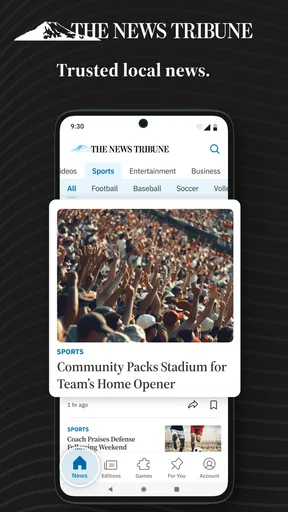
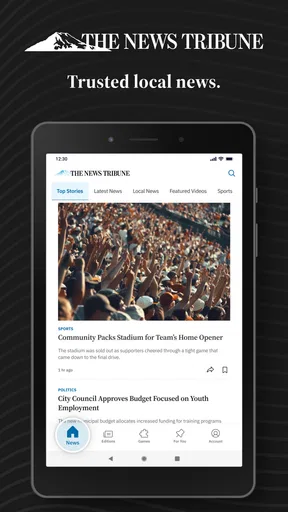
First off, downloading the Tacoma News Tribune Newspaper app is a breeze. Available on both Android and iOS, it’s a quick install from the Google Play Store or Apple’s App Store. Once you’re in, the app welcomes you with a clean and intuitive interface. No clutter, just straightforward access to the day’s headlines.
Navigation and User Experience
Let me tell you, navigating through the app is as smooth as butter. The menu is tucked neatly at the bottom, giving you easy access to sections like News, Sports, and Opinion. Want to dive into a specific topic? Just tap on the section you’re interested in. Each article is neatly presented with a headline and a thumbnail image, making it super easy to decide what to read next.
The app also offers a seamless reading experience. The text is crisp, and the images are sharp, which is perfect for those of us who love a visually appealing story. Plus, you can customize the font size to suit your reading comfort. And if you’re like me, who often reads on the go, the offline reading feature is a lifesaver. Just download your articles while you have Wi-Fi, and you’re all set for reading on your commute.
Content Quality and Variety
Now, onto the heart of the app—the content. You’ll find a wide array of articles covering everything from local politics to high school sports. The coverage is comprehensive, and the reporting is solid. I’ve been particularly impressed with the in-depth investigative pieces that really dive into the issues affecting the community. It’s not just news either; the app offers engaging opinion pieces and editorials that spark conversation.
Sports lovers, rejoice! The app has got your back with extensive coverage of both local and national sports. Whether you’re following the Tacoma Rainiers or catching up on the Seahawks, you’ll find detailed reports and insightful analysis.
Additional Features
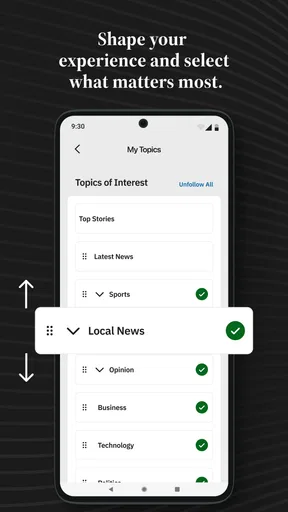
One feature I really appreciate is the personalized news alerts. You can set your preferences to receive push notifications on topics you care about the most. It’s like having your own personal news curator right in your pocket. The app also offers an e-edition, which is a digital replica of the print newspaper. It’s perfect for those who miss flipping through the pages but love the convenience of digital.
To get more from those tools, I would keep alerts narrow and use them for subjects where timing matters, then browse the other sections when I have a moment. The e-edition may suit readers who like the familiar rhythm of a newspaper laid out as a whole, while article-by-article browsing is easier when I only have a few minutes. Those are different ways to read, not features everyone needs at once, so I would choose the format that fits my routine instead of trying to use every option.
Subscription Details
While the app is free to download, accessing premium content requires a subscription. If you’re a news junkie like me, it’s well worth the investment. The subscription gives you unlimited access to all articles, so you never have to worry about hitting a paywall. Plus, subscribing supports local journalism, which is always a plus in my book.
The app occasionally offers free trials, so keep an eye out if you want to test the waters before diving in. And let’s be real, supporting your local paper feels pretty good, doesn’t it?
I would still make the decision based on my actual reading, not on a vague intention to catch up someday. A useful trial period means opening the app across different days and checking whether the local stories I care about are there often enough to justify continued access. I would also confirm the renewal and cancellation terms before accepting any offer, since purchase details can vary. If I only want a handful of stories a month, browsing without a subscription or using another source may be a better fit.
Who should keep it—and who may not need it
I would recommend trying it if Tacoma-area news is part of your daily life, if you follow local sports, or if you want a newspaper-style source for civic and community coverage. It can also make sense for someone who has moved away but still wants a routine way to follow developments in the region. The app is less compelling for a reader whose interests are almost entirely national or international, or for someone who avoids subscriptions and rarely reads beyond headlines.
There is also a trade-off in relying on one publication for a local picture. A regional paper can provide depth and continuity, but readers who want to compare perspectives should deliberately consult other sources on consequential issues. I would use this app as a dependable starting point for Tacoma coverage, then seek additional reporting when I need a broader view or a specialist answer. That approach respects the paper’s local value without treating any one feed as the whole story.
Final Thoughts
All in all, the Tacoma News Tribune Newspaper app is a well-rounded digital companion for anyone interested in staying informed about Tacoma and beyond. It’s user-friendly, packed with quality content, and offers customizable features that enhance your reading experience. So, if you’re keen on keeping up with Tacoma’s happenings, this app is definitely worth checking out. Now, if you’ll excuse me, I’ve got some more articles to catch up on!
My recommendation is straightforward: install it if local reporting is something you will read regularly, and give yourself a short, deliberate test before paying. Try the sections you naturally care about, decide whether alerts help or distract, and notice whether the app’s newspaper format fits the time you have. If Tacoma is only an occasional interest, a browser search or broader news source may be enough. If the area is part of your everyday life, this is a focused way to keep its stories close at hand.
Pros
- User-friendly interface enhances reading experience.
- Comprehensive local news coverage.
- Real-time updates keep you informed.
- Customizable news alerts.
- Access to exclusive content and features.
Cons
- Subscription required for full access.
- Occasional ad interruptions.
- Limited offline reading options.
- Some sections load slowly.
- App size is relatively large.
FAQs for Tacoma News Tribune: WA Latest
What features does the Tacoma News Tribune Newspaper app offer?
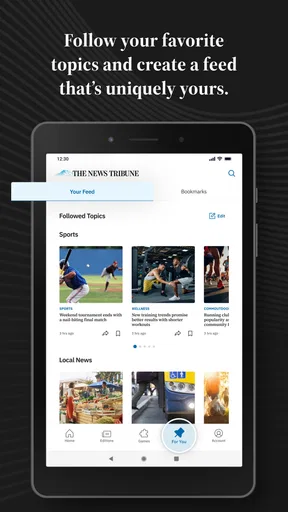
The Tacoma News Tribune Newspaper app provides users with up-to-date local news, sports updates, and weather forecasts. It includes interactive features such as breaking news alerts, customizable topics, and the ability to save articles for offline reading. The app also offers video content, photo galleries, and editorial opinions to give readers a comprehensive news experience.
Is there a subscription fee for the Tacoma News Tribune Newspaper app?
Yes, while the app itself is free to download, access to premium content typically requires a subscription. Users can choose from various subscription plans, which may include digital-only access or bundled options with print delivery. The app often offers a free trial period for new subscribers to explore its full range of features.
Can I customize the news topics I see in the app?
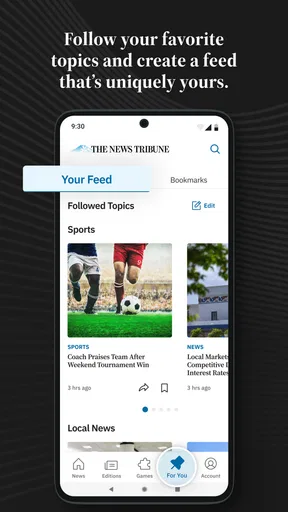
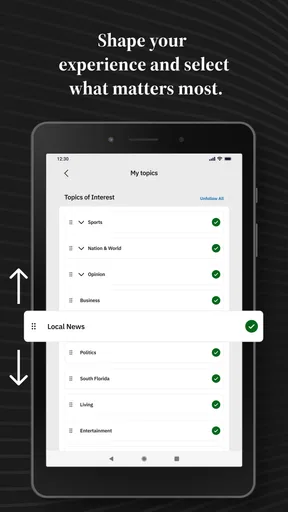
Absolutely. The Tacoma News Tribune Newspaper app allows users to personalize their news feed by selecting specific topics of interest. This customization ensures that you receive updates and notifications on the news that matters most to you, whether it’s local politics, business, sports, or cultural events.
How frequently is the content updated in the Tacoma News Tribune Newspaper app?
The content in the Tacoma News Tribune Newspaper app is updated continuously throughout the day. This ensures that users have access to the latest news as it happens. Breaking news alerts are sent in real-time to keep you informed about important events in the Tacoma area and beyond.
Is the Tacoma News Tribune Newspaper app available on both Android and iOS devices?
Yes, the Tacoma News Tribune Newspaper app is available for download on both Android and iOS platforms. Users can find the app in the Google Play Store for Android devices and the Apple App Store for iOS devices. Both versions offer similar features and functionality, providing a seamless news-reading experience across different devices.


